Multi-Channel Replenishment Software: 7 Key Tools

If your inventory data is split by channel, you will get stockouts, overstocks, and oversells. I’d look for software that handles seven core jobs in one flow: forecasting, reorder rules, inventory sync, PO workflow, WMS data, supplier updates, and reporting.
Here’s the short version: multi-channel replenishment works when the system uses one shared inventory view, applies channel-level rules, and turns demand into purchase orders, transfers, and alerts without a lot of manual work. That matters because U.S. businesses can lose billions each year to stockouts and excess inventory, and carrying excess stock often costs 20% to 30% of its yearly value.
If I were reviewing a tool, I’d make sure it can:
- forecast demand by SKU, warehouse, channel, and time period
- trigger reorders using ROP, safety stock, and lead time
- keep ATP synced across DTC, marketplaces, retail, and wholesale
- separate hard commits from soft reserves
- create and route POs with supplier rules and EDI support
- connect with the WMS for live stock, pick-face refill, and returns
- use ASNs, lead-time data, and fill rates to update replenishment settings
- report by channel, SKU, and warehouse so planners can spot stockout and overstock risk fast
Real-Time Multi-Channel Inventory Sync Across ERP, Shopify, Amazon & More | APPSeCONNECT Demo
sbb-itb-eafa320
Quick Comparison
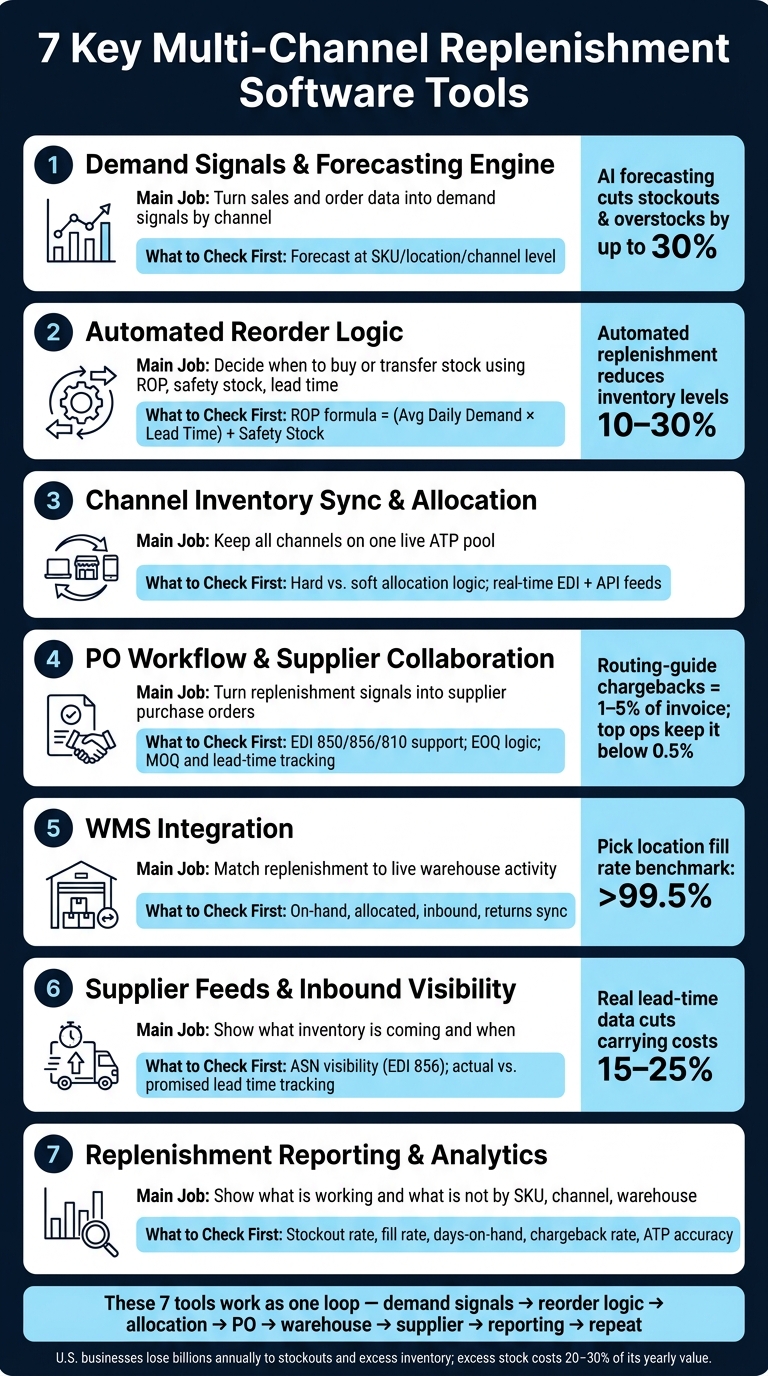
7 Key Multi-Channel Replenishment Software Tools: What Each Does
- Demand Signals & Forecasting: Converts sales and order data into demand forecasts across channels; first verify that forecasting is performed at the SKU, location, and channel level for maximum accuracy.
- Automated Reorder Logic: Determines when inventory should be reordered or transferred between locations; review reorder points (ROP), safety stock levels, and approval rules to ensure replenishment aligns with business goals.
- Inventory Sync & Allocation: Maintains a single, real-time available-to-promise (ATP) inventory pool across all sales channels; evaluate how the system handles hard versus soft allocation to prevent overselling and stock conflicts.
- Purchase Order Workflow & Supplier Integration: Converts replenishment recommendations into supplier purchase orders; confirm support for EDI 850, 856, and 810 transactions, along with minimum order quantities (MOQs) and lead-time tracking.
- WMS Integration: Synchronizes replenishment decisions with live warehouse activity; verify visibility into on-hand inventory, allocated stock, inbound shipments, and returns to ensure accurate inventory planning.
- Supplier Feeds & Inbound Visibility: Provides insight into incoming inventory and expected arrival dates; check for advanced shipping notice (ASN) visibility and reporting that compares promised versus actual supplier lead times.
- Reporting & Analytics: Delivers performance metrics that highlight inventory strengths and weaknesses; prioritize dashboards for stockouts, fill rate, days on hand, and retailer chargebacks to support continuous improvement.
Bottom line: I’d treat these seven tools as one system, not seven separate features. When they work together, you can cut manual work, lower excess stock, and keep each channel from taking inventory meant for another.
What Multi-Channel Replenishment Software Must Do
Multi-channel replenishment software needs to tie demand by channel, inventory, purchasing, supplier limits, warehouse execution, and performance data into one workflow. The aim is simple: keep the right SKU in the right warehouse for the right channel at the right time.
Connect Sales, Inventory, Purchasing, and Warehouse Data
Replenishment decisions don't work in a vacuum. Set a reorder point without factoring in a supplier's actual lead time, and you're asking for trouble.
Good software pulls in DTC, marketplace, retail, wholesale, ERP, and WMS data into one source of truth, including both EDI and API feeds. With that shared data layer, teams can manage one available-to-promise inventory pool across all locations.
Once that data sits in one place, the software can make inventory decisions at the channel level.
Support Channel-Specific Inventory Decisions
Retail POs need hard commits. DTC and marketplace orders usually rely on soft reserves until shipment.
Wholesale, retail, and DTC also run on different replenishment cadences. That's why one set of rules across every channel tends to create stock imbalances instead of fixing them.
Of course, rules on their own don't do much. The system has to turn them into action.
Turn Planning Into Executable Replenishment Actions
The best systems compare live inventory against reorder rules and then automatically create purchase orders, transfer tasks, or reorder alerts.
Automated replenishment systems can reduce overall inventory levels by 10% to 30% while simultaneously improving product availability.
Those capabilities show up in the seven tools below.
1. Demand Signals and Forecasting Engine
A forecasting engine turns connected sales, inventory, and supplier data into replenishment signals by SKU, location, channel, and time period. For multi-channel operations, that means separate demand signals for DTC, marketplace, retail, and wholesale replenishment.
The strongest systems work at the SKU, location, channel, and period level. They pull in live sales data from DTC and marketplace platforms, along with committed demand from retail and wholesale EDI orders. That matters because demand doesn’t show up the same way everywhere. A spike on your DTC site is one thing. A batch of wholesale orders is another.
Modern forecasting engines use statistical and machine-learning models to account for seasonality, promotions, and live pick-location levels. Then they trigger internal replenishment when active stock drops below set minimums. Done well, AI-driven forecasting can cut stockouts and overstocks by up to 30%.
Forecast accuracy also gets better when the model reflects vendor performance. Supplier lead time, fill rate, and on-time delivery data should adjust safety stock on their own. If a supplier slips often, your system shouldn’t act like everything is fine.
One more thing: clean your historical POS and e-commerce data before feeding it into the model. Stockouts, promotions, and entry errors can skew the forecast baseline.
Those forecast outputs feed the reorder rules in the next tool.
2. Automated Reorder Logic and Replenishment Rules
Once your forecasting engine starts sending demand signals, automated reorder logic handles the next step: when to move. The main formula is simple: Reorder Point (ROP) = (Average Daily Demand × Lead Time) + Safety Stock.
When inventory hits that point, the system can create a purchase order or transfer order on its own. From there, it can either approve the order automatically or route it to someone for approval.
In multi-channel operations, this gets a lot more nuanced. Channel-aware allocation makes sure one sales channel doesn't eat inventory already spoken for by another. For example, a confirmed retail EDI 850 order should hard commit inventory and cut DTC available inventory right away. DTC and marketplace orders, on the other hand, can sit on a soft reserve against whatever inventory is still available. If you skip that distinction, overselling becomes a very real problem.
Safety stock rules need that same channel-level logic. A brand might set fixed minimums by channel, like holding back 50 units for wholesale, so a spike in DTC orders doesn't drain stock already committed to a retailer.
That matters because missing a retail delivery window isn't just annoying. It can get expensive fast. Chargebacks usually land between 1% and 5% of invoice value, although well-run operations can keep that exposure below 0.5%.
These rules trigger the purchase-order workflow in Tool 4.
3. Channel Inventory Sync and Allocation Control
Once reorder rules are in place, inventory has to stay in sync across every channel. Those rules only hold up when each channel is reading the same live inventory count. The main danger is visibility lag. If one channel is even a little behind, allocation mistakes start to pile up.
That’s why the setup needs one shared available-to-promise (ATP) pool. Instead of carving stock into separate channel buckets, the software keeps a single shared count and updates it in real time. If retail makes a commitment, DTC availability drops right away. DTC and marketplace orders can reserve only what’s still left.
For that ATP pool to stay current, the system needs to ingest orders and inventory updates in real time. It should support EDI for wholesale and retail partners, plus API connections for DTC carts and marketplaces. Direct API connections are the better option because middleware can add latency and extra failure points. The software should also pull data from the WMS, POS, shipments, and returns so ATP reflects what’s happening on the ground.
When you’re reviewing software, ask for a live demo of the allocation logic under channel conflict. Don’t settle for a polished slide. You want to watch the system deal with a case where a retail PO and active DTC orders are fighting over the same units at the same moment. Those live allocation decisions then feed into purchase order creation in the next step.
4. Purchase Order Workflow and Supplier Collaboration
Once channel allocations are locked, the system should turn replenishment demand into purchase orders without a bunch of manual cleanup. A solid PO workflow takes those replenishment signals, creates POs, and then routes them for approval or auto-release based on preset rules.
Order sizing plays a big role here. The software should use Economic Order Quantity (EOQ) logic to balance ordering costs with holding costs, then adjust for supplier minimums and volume discounts. That sounds technical, but the idea is simple: order too little and you place too many POs; order too much and cash sits on the shelf.
For retail and wholesale channels, the workflow also needs to support these EDI transaction sets:
- 850 for Purchase Order
- 856 for Advance Shipping Notice
- 810 for Invoice
This is where execution can get expensive. Routing-guide violations can trigger chargebacks of 1% to 5% of the total invoice value, while well-run operations keep exposure below 0.5% through strict compliance monitoring. If you're selling into retail channels, it also helps to check support for EDI trading partners with major retailers like Target, Walmart, or Costco.
The system should also track actual lead times and fill rates so safety stock and reorder points stay calibrated over time. Supplier updates don't just help purchasing. They also make inbound warehouse planning a lot tighter.
For 3PL-run operations, this workflow matters even more. Compliant POs and ASNs give the warehouse advance notice of inbound shipments, which helps with labor planning and makes it easier to restock pick locations before they run dry. That inbound visibility feeds the warehouse and WMS integration next.
5. Warehouse Data and WMS Replenishment Integration
A WMS feed keeps replenishment tied to what’s actually happening in the warehouse: on-hand stock, allocated units, and inbound inventory. Without that feed, the system ends up reordering from stale counts. And that’s when stockouts, oversells, or too much inventory start to creep in. The main job here is simple: maintain one live inventory record. That same live view also sets the stage for supplier inbound visibility in the next tool.
Channel allocation rules only work if the WMS applies them on the warehouse floor. That’s where things get messy. The system has to tell the difference between soft reserve units set aside for live DTC orders and hard commit units locked for wholesale or retail POs. If it can’t, the same unit can get promised to two different buyers. Then the WMS has to sort out that conflict in real time to stop overselling.
The WMS also manages internal replenishment. In plain English, it moves stock from bulk storage into active pick locations before a pick face runs empty. That matters more than it sounds. If pick locations dry up, fulfillment slows down fast. A pick location fill rate above 99.5% is a solid benchmark for avoiding those bottlenecks. And that warehouse data doesn’t stay boxed in. It flows straight into supplier feeds and inbound visibility.
Returns matter here too, even though teams often treat them like an afterthought. A DTC customer return and a bulk retail pallet return both need to be processed inside the WMS, sorted into sellable or unsellable stock, and synced back to the replenishment engine. If that sync breaks, available inventory gets distorted. In 3PL-managed operations, this link keeps replenishment lined up with what the warehouse is doing from hour to hour.
6. Supplier Feeds and Inbound Visibility
Warehouse data shows what you have right now. Supplier feeds show what’s on the way and when it should land. If you don’t have that inbound view, your replenishment engine is working half-blind. It can’t tell whether you’re staring at a real stockout risk or inventory that’s still moving through the supply chain.
At the center of this setup is EDI integration. Three transaction sets do most of the work: the EDI 850 (Purchase Order) starts the supply request, the EDI 856 (Advanced Shipping Notice, or ASN) confirms what shipped and when it’s expected, and the EDI 810 (Invoice) closes the loop on billing. The ASN matters most in day-to-day warehouse work. It gives the warehouse a heads-up, so receiving tasks can be lined up before the truck even arrives. Miss that step, and the pain isn’t limited to slower receiving. Retailer routing guides and ASN rules often carry chargebacks of 1% to 5% of the invoice value for non-compliance, while top 3PLs and replenishment systems can push that exposure below 0.5%.
The system also needs to monitor actual versus promised lead times by supplier and SKU. Static lead times look fine on paper, but paper doesn’t unload trucks. If a supplier keeps running late and the system still plans around the quoted lead time, safety stock ends up mis-sized and stockout risk goes up. When real delivery data feeds back into the replenishment engine, it can adjust safety stock buffers on its own. That kind of tuning can cut carrying costs by 15% to 25% while keeping fill rates steady.
Inbound visibility also changes how the system reacts when something slips. If a shipment gets delayed, the replenishment engine can use that signal to hard-commit the remaining on-hand units to a retail PO and trim available-to-promise quantities for DTC and marketplace channels. That helps prevent oversells. For 3PL-run operations like JIT Transportation, this kind of ERP and WMS integration is what keeps inbound data moving cleanly into live replenishment decisions across every channel.
This is also where exception management starts to pay off. Good setups don’t bury planners under a pile of alerts. They flag the moments that need a human call, like:
- A supplier running far behind schedule
- A partial shipment that won’t cover the full PO
- A vendor whose fill rate has dropped below threshold
Everything else should keep moving automatically.
7. Replenishment Reporting and Performance Analytics
The first six tools tell your team what to replenish. This one tells you whether those moves actually paid off.
Without reporting, you're flying blind. You can't tell if replenishment is cutting stockouts or just piling up extra inventory and chargebacks. And those results need to be easy to see by SKU, channel, and warehouse.
Good replenishment reporting should track:
- stockout frequency
- days-on-hand
- excess inventory as a percentage of total inventory value
- inventory fill rate
It should also track demand by SKU, location, channel, and period so planners can spot where demand is moving and where forecast error is piling up.
On the warehouse side, reporting should show replenishment task completion times and pick location fill rate. That makes it easier to catch warehouse slowdowns before they start hurting fulfillment.
Reporting also helps confirm whether automation is cutting inventory without hurting product availability. That's where channel-level metrics matter in a multi-channel setup. If you lump everything together, you miss the real story.
Break performance out by:
- DTC
- marketplace
- retail
- wholesale
That way, planners can see where inventory is being overcommitted and where it's sitting idle.
For retail and wholesale, track chargeback rate. For DTC and marketplace channels, the focus changes. Here, planners need to watch same-day/next-day pick SLAs and available-to-promise (ATP) accuracy so they don't oversell inventory that's already committed somewhere else.
Supplier performance data should feed back into replenishment settings too. Use it to reset safety stock and reorder points. The reporting layer should show each channel on its own, so planners can adjust reorder rules before the next cycle starts. That view makes it easier to see how all of these tools affect one another across channels.
How the Seven Tools Work Together Across Channels
Reporting matters because it shapes the next replenishment cycle. These seven tools work as one loop: demand signals shape forecasts, forecasts set replenishment in motion, replenishment updates inventory, and the results feed the next cycle.
From Demand Signals to Purchase Decisions
APIs and EDI feeds pull in live demand from DTC, marketplace, retail, and wholesale channels. That data moves into the forecasting engine, which uses machine learning to account for seasonality, promotions, and historical trends.
Once the forecast is in place, reorder logic takes over. The system compares live inventory against reorder thresholds and triggers replenishment when stock gets low. Then channel allocation logic steps in. Hard-commit reserves protect units already promised to retail POs, while the remaining ATP quantity stays open for DTC and marketplace orders.
Once the order is created, supplier and warehouse data decide when and how it can move.
From Supplier Updates to Warehouse Execution
A PO is only a plan until the supplier confirms it. When that confirmation comes in - along with an EDI 856 ASN - the system updates projected stock levels before the goods even reach the dock. That inbound visibility gives planners time to adjust allocations or flag shortfalls early, instead of scrambling after a shelf goes empty.
When inventory arrives, the WMS takes over. It watches pick-location levels in real time and creates internal replenishment tasks to move stock from bulk storage to active pick slots.
How Reporting Improves the Next Replenishment Cycle
Reporting feeds the next replenishment cycle. Fill rate, stockout frequency, and forecast error data flow back into safety stock formulas and reorder point settings. Supplier lead-time variance is tracked against actual delivery performance, so the system adjusts buffers automatically for vendors that keep running late.
That feedback loop turns seven separate functions into one replenishment system. It keeps multi-channel replenishment lined up across every channel.
Conclusion
Multi-channel replenishment works when seven functions run as one system: demand signals, reorder logic, channel allocation, PO workflows, warehouse integration, supplier visibility, and reporting. They form a continuous loop. Signals shape the rules, rules shape allocation, allocation shapes execution, and the results feed the next cycle.
That matters because every channel plays by its own rules. Across DTC, marketplaces, retail, and wholesale, each one has different SLAs, compliance rules, and demand patterns.
That channel-level logic holds up only when fulfillment data stays in sync. For brands working with a 3PL partner like JIT Transportation, shared stock levels and order priorities keep replenishment tied to fulfillment and cut manual handoffs.
FAQs
How do I know if my replenishment software is truly multi-channel?
Check whether it acts as a centralized data hub across your operation. In plain English, that means it should sync inventory in real time across your website, marketplaces, and retail locations, so sales, returns, and transfers update stock right away.
It should also connect through APIs with your ERP, WMS, and 3PL partners like JIT Transportation. That helps with automated order routing, shared inventory visibility, forecasting across locations, and purchase order generation from one source of truth.
What data integrations matter most for accurate replenishment?
Accurate replenishment starts with connecting your replenishment software to your ERP, WMS, and sales channels.
That connection matters because replenishment decisions are only as good as the data behind them. If one system is behind, the whole picture gets blurry fast.
What matters most is:
- real-time inventory updates across platforms
- clean demand data from sales and open purchase orders
- supplier and lead-time data through EDI
- SKU-level visibility into on-hand, in-transit, and allocated inventory
Standardized APIs help cut data silos and keep decisions current.
Which KPIs should I watch first after implementation?
Start with forecast accuracy, stockout frequency, and order fill rate. These three metrics give you a clear read on how well demand planning and replenishment are performing.
Then track lead time variability, carrying cost percentage, and inventory turnover ratio. They help you spot supplier problems, excess stock, and money tied up in inventory longer than it should be.
Related Blog Posts
Related Articles

Demand-Driven Replenishment for Multi-Node 3PL
3PL Models Compared for Reverse Logistics Carbon