7 NLP Uses in Logistics Customer Support

Most logistics support teams don’t need more tickets handled by hand. They need fewer repeat tickets in the first place.
I’d sum up the article like this: NLP helps logistics teams sort, answer, and route common support requests across email, chat, SMS, and phone. The best starting points are the highest-volume tasks, especially WISMO, shipment status, ETA updates, and standard returns. That matters because WISMO can make up 40%–60% of inbound e-commerce support contacts, and one case study cut order-status requests from 300 per day to 20.
Here are the 7 uses covered:
- Automatic ticket tagging and routing for delays, billing, and returns
- Self-service order lookup and shipment tracking for common status questions
- ETA replies and delay alerts based on live shipment data
- Returns, refunds, and RMA intake with policy checks
- Voice-to-text intake and call transcription for phone and voicemail
- Sentiment analysis to spot unhappy customers early
- Agent assist to help reps with replies, summaries, and next steps
The main takeaway is simple: if you connect NLP to TMS, WMS, OMS, ERP, carrier feeds, and CRM data, you can send many repeat requests down the right path with less manual work. If the data is messy or out of date, the system turns into little more than an FAQ bot.
Quick Comparison
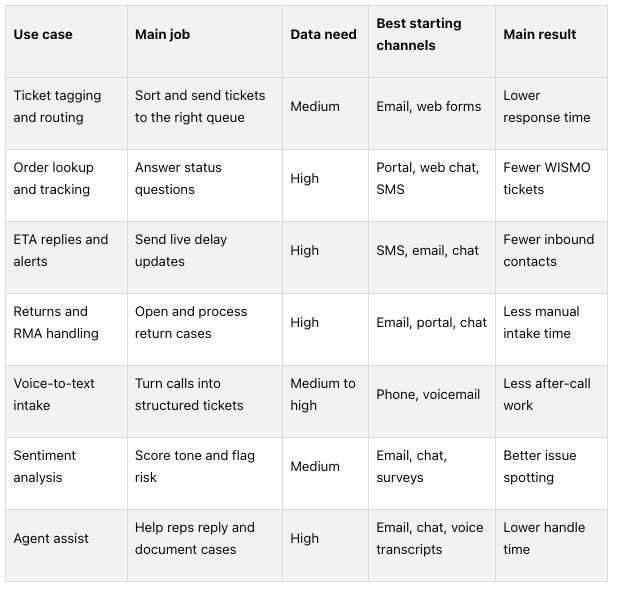 If I were rolling this out, I’d start with ticket tagging and order lookup, then move to ETA alerts, returns, sentiment, and agent assist once the data connections are in place.
Why NLP Works Well in Logistics Customer Support
Support agents deal with the same requests all day long. The twist is that customers rarely phrase them the same way. One person asks for freight status. Another asks whether a shipment has left yet. A third says they need an update on a load. NLP helps connect those different phrasings to the same intent and pull the right data. That’s a big reason logistics support is such a strong match for NLP.
The speed factor matters too. In logistics, timing isn’t just important - it can make or break the day. An urgent note about a driver who’s still far from the dock before a receiving window closes isn’t just a basic update request. It needs fast attention. NLP can spot signals like missed delivery or damaged pallet and send those cases to priority queues on its own.
Reverse logistics gets messy fast. A single message might mention an overage, damage, and a return request all at once. Instead of making an agent sort through that by hand and re-enter each detail, NLP can parse the message, sort the issues into the right case type, and send it into the right workflow.
Billing disputes work in much the same way. If a customer questions an accessorial charge, the NLP system can label it as a billing dispute, pull up the policy, and draft a reply. That helps cut down on shift-to-shift variation and keeps responses more consistent.
What makes all of this work is simple: customer language may be messy, but the intent behind it usually follows a pattern. NLP pulls out the key fields - order IDs, dates, times, amounts, and ZIP codes - and matches them to the right shipment record in a TMS or WMS. Those same signals drive the seven use cases below, starting with automatic ticket tagging and routing.
sbb-itb-eafa320
1. Automatic Ticket Tagging and Routing
Logistics inboxes fill up fast with delayed shipment notes, billing questions, and return requests - all written in different ways. NLP reads each message, figures out what it’s about, and sends it to the right queue.
Support workflow automated
When a message comes in - by email, web form, live chat, SMS, or even a call transcript - the NLP model scans the text for intent and pulls out key details such as order numbers, tracking IDs, locations, and product SKUs. It then adds tags like shipment_delayed, billing_invoice, or RMA_request and routes the ticket to the right team.
It can also spot urgent signals on its own. If the message points to a temperature-sensitive shipment or a missed cutoff, the system applies a priority flag automatically. That means urgent cases jump ahead of routine ones instead of sitting in line.
Logistics data required
This setup works best when the NLP layer connects with TMS, WMS, and CRM data. That gives it a way to check shipment details and apply account rules before the ticket moves forward.
With those data connections in place, routing gets faster and more accurate.
Operational impact
Industry data shows 20–30% lower response times from automated routing alone, along with 25–30% better first-contact resolution compared with manual triage methods.
Best-fit channels
Email and web forms are the best place to start. They usually include enough text for steady classification, and they make up a big share of B2B logistics communication.
Live chat and SMS are the next step. They tend to be short and time-sensitive, but NLP can still catch messages like truck still not here and route them in near real time.
Later on, the same tagging logic can extend to call transcripts, giving you one NLP triage layer across the channels your customers already use.
Once tickets are tagged and routed, the next step is letting customers find shipment answers without opening a case.
2. Self-Service Order Lookup and Shipment Tracking
Once cases are routed, the next win is cutting off simple status checks before they turn into tickets. In logistics support, few things show up more often than shipment questions like "Where is my order?", "Has order 58391 shipped yet?", or "Why is my shipment delayed?" NLP-based self-service tools can take care of those requests without pulling in an agent. For 3PLs, that means customers can check order and warehouse status on their own instead of waiting in line.
Support workflow automated
Here’s how it works in practice: the NLP layer figures out what the customer wants, pulls out the order or tracking details, checks data from the TMS, WMS, or carrier, and returns the current shipment status. If the message is too vague or brings back more than one match, it asks a follow-up question to narrow things down.
If the shipment shows an exception, such as damaged, delayed, or delivered but not received, the system passes the case to an agent. The key detail is that it sends the context along with it, so the agent doesn’t have to start from scratch.
Logistics data required
This use case lives or dies on clean, current shipment data. At a minimum, the system needs:
- order number
- tracking number
- ZIP code or email
- carrier
- current milestone
- ETA
- exception code
- POD status
- last scan time
For 3PL and multi-warehouse operations, warehouse-level milestones matter too. That lets the system tell a customer whether an order is picked, packed, shipped, or out for delivery, instead of giving a fuzzy "in transit" reply.
Operational impact
One logistics chatbot case study showed manual order-status inquiries dropping from 300 per day to just 20 per day - a 93% reduction - after an NLP tool was deployed with access to logistics data. First-contact resolution for delivery-status questions also went from 60% to 98% in that same rollout.
That kind of shift does two things fast: it handles after-hours volume and gives agents more time for the messier cases that need human judgment.
Best-fit channels
Web chat and customer portals are usually the best place to start, especially when customers are already logged in and can be authenticated automatically. Mobile apps and SMS are a good fit for quick status checks. IVR voice bots help customers who still want phone-based self-service. Email fits triggered status replies and exception alerts when live channels aren’t available.
When a lookup shows a delay or other exception, that same shipment data can also power proactive ETA replies and alerts.
3. Delivery ETA Replies and Exception Notifications
When a lookup shows a delay, NLP can do more than answer a question. It can send an update first.
If a shipment slips, the system can share a live ETA or trigger an exception alert before the customer even reaches out. That shift matters. Instead of waiting for a “Where is my order?” message, support can get ahead of the problem.
Support workflow automated
For delivery timing questions, NLP identifies the request as a WISMO query, verifies the user, and pulls live data from carrier APIs or a TMS to return the current shipment status.
That reply can include:
- Live shipment location
- ETA
- Delay reason pulled from carrier API and TMS data
From there, the same NLP setup can watch shipment data and send an SMS or email when an exception shows up, like a customs hold, a missed scan, or a failed delivery attempt. In some cases, that cuts delivery support contacts by up to 72%.
Logistics data required
Good ETA replies depend on live feeds from the carrier, TMS, and WMS, along with shipment details like service level, destination, and current milestone.
Operational impact
Automating ETA replies and exception alerts can push self-serve resolution rates to 85% to 95% for tracking queries.
Hardloop reported 8x faster claims resolution and 3x faster first-response times after automating delivery exception workflows.
Best-fit channels
SMS and email work best for proactive alerts. Chat is a strong fit for live ETA replies. Voice AI can also handle shipment-status calls in under one second.
If the problem shifts from a delay to a return, the same NLP layer can route it into returns and RMA handling.
4. Automated Returns, Refund, and RMA Handling
When a delayed shipment turns into a return, NLP can carry that case straight into RMA handling.
Returns generate a lot of repetitive, detail-heavy support work. NLP can spot return, refund, and RMA intent, then pull the fields needed to open the case. U.S. retailers processed $743 billion in returns in 2023. That kind of volume creates a constant flow of requests, and manual handling leaves plenty of room for mistakes.
Support workflow automated
After NLP flags a return request, it extracts the main details - order ID, SKU, quantity, reason for return, and delivery date - then checks eligibility against policy rules like the return window, product category, and contract terms. From there, it can create or update the RMA record automatically.
If the case falls outside the usual path, the system can pre-fill forms and tickets so an agent only has to review and approve. For simple parcel returns that fall inside the allowed window, the process can move from intake to label delivery with very little human review. Manual returns take 18–22 minutes each, while automated systems can cut that to under 2 minutes for straightforward cases.
In a 3PL setting, JIT Transportation can connect NLP to WMS, TMS, and ERP systems to generate labels, schedule pickup, and trigger inspection, receipt, or kitting workflows.
Logistics data required
This kind of automation depends on pulling the right data from the right systems. That usually means:
- Order and invoice data from the ERP or order management system
- Inventory and location data from the WMS
- Shipment history and proof-of-delivery from the TMS
- Data from any 3PL platform used for reverse logistics
NLP models also need to standardize how customers describe the same record. In plain terms, PO #56789, purchase order 56789, and order 56789 should all map to the same case. If that mapping breaks, the whole workflow starts to wobble.
Operational impact
Speed is only part of the story. Automation also cuts down on errors. NLP applies eligibility rules the same way every time, which helps reduce mis-keyed order numbers, wrong return locations, and policy exceptions that slip through during manual intake.
The same intake layer can also handle phone-based requests through voice-to-text transcription. That matters because not every customer wants to fill out a portal form, and support teams still need one clean path for intake.
Best-fit channels
Email and web portals work best for more involved return requests because customers can share full context and attach photos or videos of damaged goods. Live chat fits guided, step-by-step flows where the bot asks for each required detail one at a time. SMS works better for simple status checks than for full RMA creation.
5. Voice-to-Text Intake and Call Transcription
Phone support adds another stream of input to the same NLP workflow. Calls about a missed delivery, a damaged pallet, or a change to the drop-off window often come in through a live call or voicemail. Voice-to-text turns those conversations into searchable tickets that can move straight into intent detection, ticket creation, tagging, prioritization, and routing.
Support workflow automated
After a call is transcribed, NLP figures out the intent and pulls out the key details: order number, tracking ID, delivery ZIP code, carrier name, or appointment time. From there, the system can open a new ticket or update the right one on its own.
For example, a late-shipment call can be logged as a delay exception, tied to the correct shipment record, and sent to the operations queue. If the caller reports damaged goods, the transcript can kick off a returns or claims workflow right away. For 3PL operations like JIT Transportation, calls tied to fulfillment, kitting, or white glove delivery can also be sorted and routed with much better accuracy when the model is trained on those service terms.
Logistics data required
Transcription works best when the audio is clean and the system can check against the right reference data. That usually includes shipment IDs, BOL numbers, tracking numbers, order records, delivery windows, customer names, addresses, and carrier details.
It also helps a lot when the model is trained on logistics language. Terms like "POD", "dock appointment", "reconsignment", and "linehaul" can be misheard if the system hasn't seen them before. And when call quality drops, alphanumeric order numbers and tracking codes need confidence checks and field confirmation so bad data doesn't slip into the ticket.
Operational impact
The numbers here are hard to ignore. A global logistics provider cut after-call work from 4.5 minutes to 2.5 minutes, increased calls handled per agent by 25%, cut wait times by 20%, and reduced shipment-ID entry errors by 70%. BM2 Freight Services reported 20% efficiency gains after deploying AI-powered transcriptions and call recaps to improve operational decision-making.
Each call also turns into a searchable record. That matters for QA, disputes, and spotting repeat issues. It also gives support teams cleaner inputs for issue tracking and reporting.
Best-fit channels
The best fit for voice-to-text intake is:
- Inbound phone support
- After-hours voicemail
- Driver check-in calls
These channels already depend on spoken updates that need to be recorded fast and with as few errors as possible.
6. Sentiment Analysis and Customer Experience Reporting
Support teams often notice frustration after it has already boiled over. Sentiment analysis helps catch it earlier, before it turns into churn or a formal complaint. Once support messages are captured and transcribed, NLP can score not just intent, but tone too.
Support workflow automated
NLP-based sentiment analysis can sort emails, chats, calls, tickets, and surveys into positive, neutral, or negative. Those scores attach to the interaction record in real time. If sentiment falls below a set threshold, the system can alert a supervisor, prompt an agent to de-escalate, or start proactive follow-up.
Pair sentiment with topic tagging, and the picture gets a lot clearer. Tags like "damaged freight", "missed delivery window," or "billing discrepancy" help teams see which issue types are driving the most frustration. For a 3PL provider like JIT Transportation, that can separate transportation delays, white glove appointment issues, and pick & pack errors.
Logistics data required
Sentiment scores mean more when they’re tied to what’s happening in the operation. Each interaction should link back to shipment and order data, including:
- Order IDs
- Tracking numbers
- Delivery windows
- Service levels
- Carriers
- Lanes
- Exception reason codes, such as damaged goods or missed appointments
It also helps to add customer tier, volume, revenue, and SLA targets so teams can focus on the accounts that matter most. Bring tickets, transcripts, chats, and surveys into one feed, and pattern spotting gets a lot easier.
Operational impact
Negative sentiment tied to a lane, carrier, or warehouse often shows up before churn or complaint data does. That gives teams an earlier signal and makes CSAT and NPS more useful by showing what’s behind the score.
Best-fit channels
Sentiment analysis can work across channels, but most logistics teams start with email and ticketing. The text is structured, and that makes batch scoring simple for regular reporting.
Live chat is another strong place to start, especially for real-time escalation. If the system detects a spike in frustration in the middle of a conversation, it can prompt the agent before the exchange goes off the rails.
Voice calls usually come next, once transcription is in place. Post-delivery surveys and open-text feedback forms help fill in the gaps by picking up sentiment from customers who never contact support directly but still have strong opinions about service quality.
These sentiment signals also feed the agent assist tools covered next.
7. Agent Assist Tools for Support Teams
Once sentiment flags risk, agent assist helps agents answer with the right tone, the right policy, and the right next step.
Support agents often need shipment details, policy rules, and ticket history all at once. That’s where NLP-powered agent assist tools come in. They work like a real-time copilot, pulling the right data into one view. In practice, agent assist sits on top of the tagging, lookup, and sentiment use cases already covered. It’s the last layer of support automation, not a separate bucket.
Support workflow automated
When a message or transcript comes in, NLP reads it for intent, such as "claim damage" or "change delivery address", and pulls out key entities like order numbers, tracking IDs, dates, and locations. The assist tool can then surface the closest knowledge base article, a draft reply, and the next action to take.
After the interaction ends, the tool can also generate call summaries and CRM updates on its own. Level AI says real-time agent assist can cut 3–5 minutes of after-call work per interaction.
That kind of help only works if the system can read live shipment and customer records.
Logistics data required
To make suggestions useful, the assist tool needs live access to the TMS for shipment status and carrier assignments, the WMS for pick/pack and fulfillment history, and the OMS or ERP for order details, service levels, and customer contracts.
For a 3PL like JIT Transportation, this means an agent can get a suggested reply that already includes the correct shipment status, the next expected scan, and the customer’s specific SLA. No tab-hopping. No guessing. Just the info they need in one place.
Operational impact
McKinsey found a 9% drop in average handle time and a 14% increase in issues resolved per hour. Other industry data shows 12–25% lower AHT when agent assist, automated summaries, and knowledge recommendations work together.
There’s another upside here too. Standard reply drafts and policy checks help cut miscommunication, rework, and escalations. That matters a lot in support. One unclear message can turn a simple update into a back-and-forth mess.
These gains tend to show up most in text-first channels, where there’s enough context for the tool to make solid suggestions.
Best-fit channels
Email and live chat are the best places to start.
- Email works well for longer, fuller reply drafts.
- Live chat is better for quick prompts and follow-up questions.
- Voice usually needs live or post-call transcription before agent assist guidance can do much.
What These NLP Use Cases Need to Work
Every use case above sits on the same base layer: clean data, live integrations, and a phased rollout. If your support team can't read, classify, and act on shipment data in real time, these workflows fall apart fast.
Start by pulling 6–24 months of tickets, chat logs, call transcripts, and emails into one place. Then clean it up: standardize key fields, normalize labels, and remove duplicates. This step matters more than most teams expect. Data quality is where many rollouts stall - 77% of organizations cite it as the top obstacle to effective AI in customer service. Once the data is in shape, the next piece is a logistics-specific intent library.
Build that intent library around the requests that drive most support volume, such as:
- Shipment tracking
- Delivery ETA
- RMA initiation
- Proof of delivery
- Accessorial charge questions
Generic models often miss logistics language. Terms like PRO numbers, liftgate requests, and inside delivery can slip right past them. Each intent should include example phrases, required parameters, and clear rules for which channels it applies to.
Without live data, NLP is basically just an FAQ layer. At a minimum, you need API connections to your TMS, WMS, and OMS or ERP. For a 3PL like JIT Transportation, each query also needs to route to the right shipper account through TMS, WMS, OMS, and ERP integrations.
Channel behavior matters too. Voice, email, chat, and SMS don't work the same way, so they need their own templates and escalation rules. A text message has very different limits than a phone call or an email thread.
For rollout, begin with low-risk, high-volume flows like order lookup and standard returns. Then run a shadow review period where supervisors check auto-responses before anything goes live. Set confidence thresholds so lower-scoring cases go straight to a human agent. After those flows settle down, add things like:
- ETA alerts
- Sentiment flagging
- Agent assist
Leave claims disputes and billing escalations for later phases. Those cases usually need stronger controls, cleaner data, and more human judgment.
The comparison below shows which use cases are easiest to launch first and which need the strongest data foundation.
Comparing the 7 NLP Use Cases Side by Side
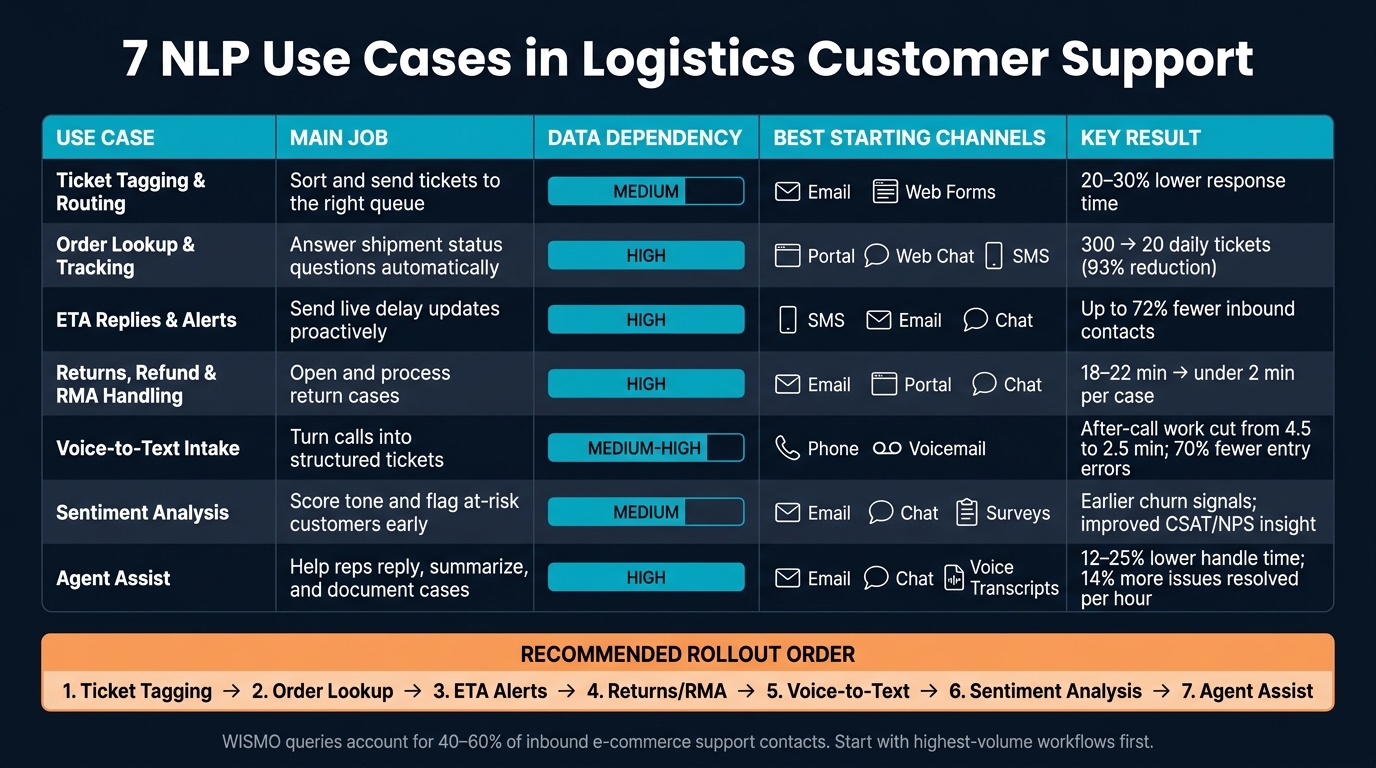
7 NLP Use Cases in Logistics Customer Support: Side-by-Side Comparison
Not every NLP use case pays off at the same point in your team’s growth. The best place to start depends on a few plain factors: where support volume piles up, how clean your data is, and how well your systems talk to each other.
The comparison below shows which use cases are easier to launch early and which ones need more data first. They’re ranked by data dependency, automation depth, and rollout speed. Use it to match each use case to your data maturity and integration depth.
Some use cases are quick wins. Others need live integrations and tighter controls.
- Automatic Ticket Tagging and Routing: Lowest lift. Historical ticket labels are enough to get started.
- Self-Service Order Lookup and Shipment Tracking: The best first automation target for logistics teams because it cuts the highest-volume status work. It depends on live shipment data and authenticated lookup.
- Delivery ETA Replies and Exception Notifications: A strong fit for cutting status-check volume and preventing avoidable contacts. It needs live carrier and TMS feeds to tell the difference between delay explanations and standard ETA replies.
- Automated Returns, Refund, and RMA Handling: Most useful when return rules are already structured.
- Voice-to-Text Intake and Call Transcription: Best for faster intake and cleaner case records. It works once speech-to-text is reliable.
- Sentiment Analysis and Customer Experience Reporting: Best for pattern detection and reporting, not direct resolution.
- Agent Assist Tools for Support Teams: Best for lower handle time and more consistent replies. It works best when live knowledge and shipment data are connected.
A practical rollout usually starts with ticket tagging and order lookup. From there, teams can add returns, ETA alerts, sentiment, and agent assist as data quality and integrations improve. That sequence only works if the data and system connections behind it are ready.
Conclusion
These seven NLP use cases tackle different support jobs. But they all depend on the same thing: live shipment and order data. That includes ticket intake, order lookup, ETA updates, returns, transcription, sentiment tracking, and agent assist. If the system can't pull from current logistics data, it can't do much to fix support issues. That's why rollout order matters.
The best place to start is with the work that already floods the queue. Focus first on high-volume requests like WISMO and shipment status. Those are usually the easiest places to show early gains: lower handle time, better self-service rates, and fewer repeat contacts.
After that, the same data setup can do more than automate routine tasks. It can also help teams see what's going wrong and help agents respond with less guesswork. Sentiment monitoring and agent assist build on the same system connections already in place, which makes them a smart next step. For logistics providers like JIT Transportation, the path is pretty clear: connect NLP to core systems, automate the busiest workflows first, and expand as data quality gets better. That keeps rollout risk low and makes results easier to track.
FAQs
What data do I need first?
Start with clean, structured data from past customer interactions, like support tickets, chat logs, and phone call summaries. That gives you a clear view of common questions and helps train your NLP tools.
You’ll also need integration with your current logistics systems, including your WMS and transportation tracking tools. That way, the platform can pull real-time order status, inventory data, and shipment updates.
Which NLP use case should I start with?
Start with a small pilot in one or two high-volume or high-risk workflows. Good places to begin are areas with clear needs, like high-value orders, product categories with high return rates, or transportation lanes with frequent exceptions.
That gives you a fast way to track results, tune the models based on feedback, and build a solid base before rolling the approach out to broader customer support operations.
How do I keep NLP from giving wrong answers?
Start with accurate data. NLP tools can’t fix bad input, so digitize day-to-day steps with scan-based workflows like barcode or RFID tracking. That gives you precise, real-time information instead of guesswork.
It also helps to use clear, plain-language SOPs rather than hard-coded rules. And add human-in-the-loop exception management so AI can flag at-risk interactions for staff review before they reach the customer.
Related Blog Posts
Related Articles

Demand-Driven Replenishment for Multi-Node 3PL

3PL Models Compared for Reverse Logistics Carbon