How 3PLs Personalize DTC Fulfillment
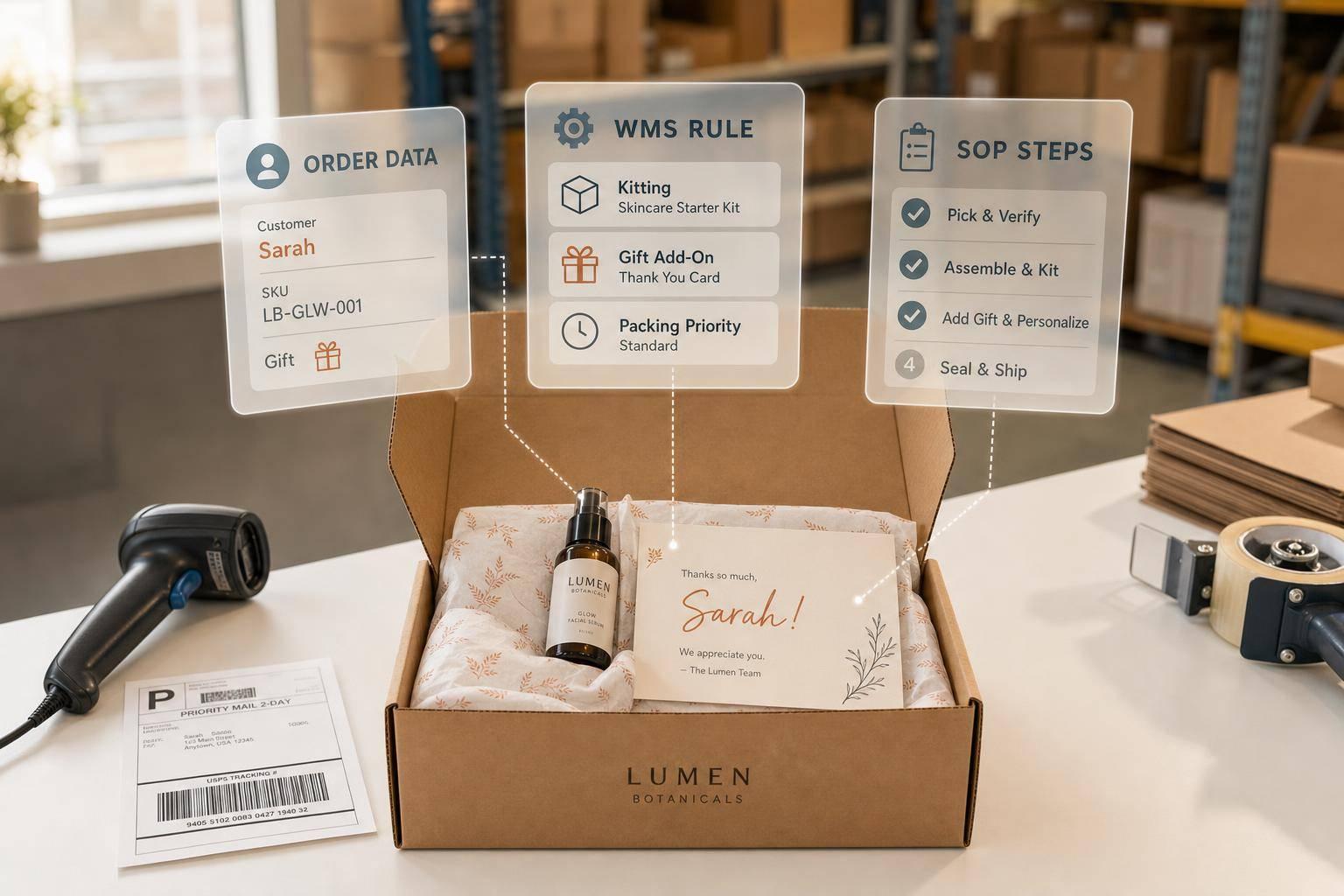
Personalized fulfillment works when the rules live in the system, not in someone’s head. If you want gift notes, custom packaging, kitting, and channel-specific pack-outs to ship on time, you need three things: clean order data, clear warehouse rules, and a tight handoff between your brand and your 3PL.
Here’s the short version:
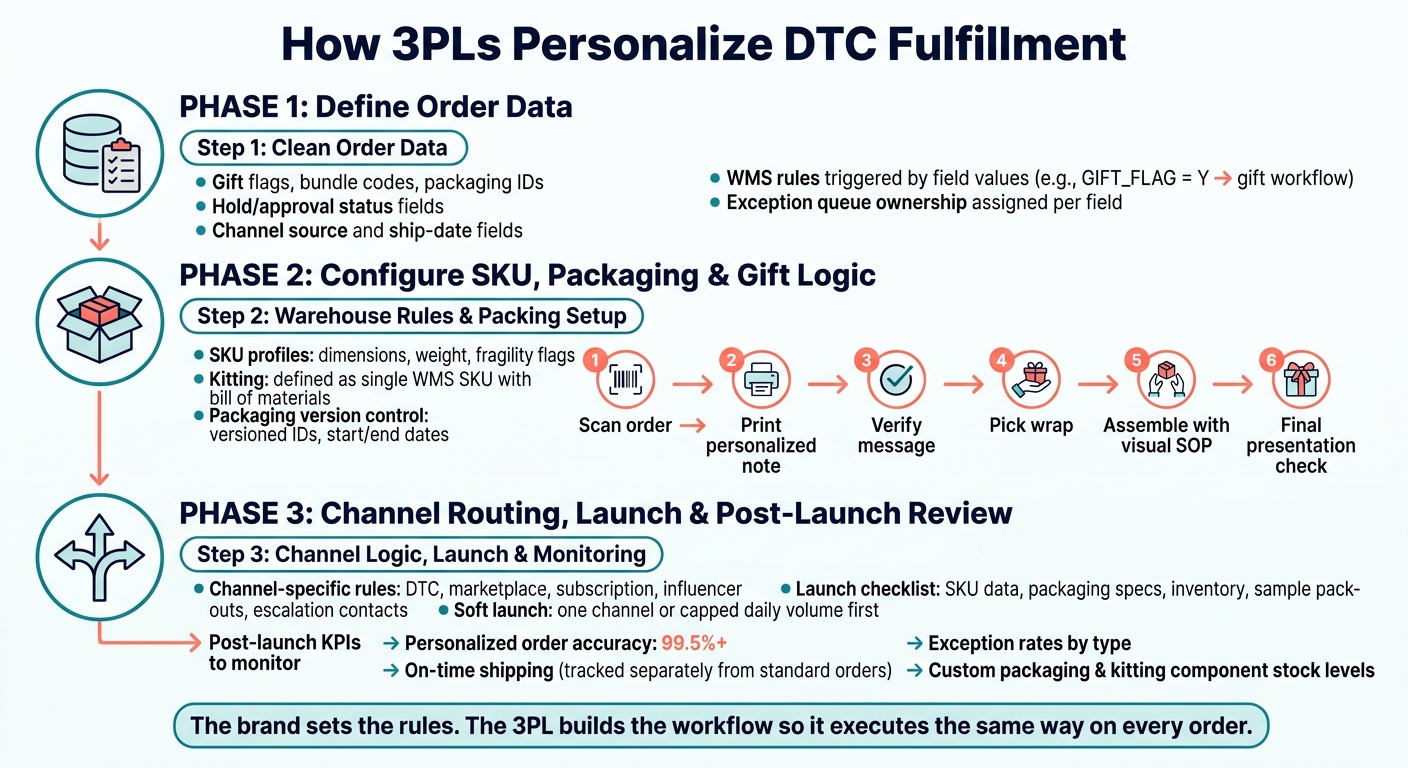
- Order data comes first. Gift flags, bundle codes, packaging IDs, hold status, and ship dates must be clean before an order reaches the floor.
- Each rule must map to a warehouse action. That includes SKU handling, insert selection, packaging version control, and gift pack steps.
- Channels need their own logic. DTC, marketplace, subscription, and influencer orders should follow different routing, carrier, and packaging rules.
- Launch checks matter. Sample pack-outs, inventory checks, named contacts, and a soft launch help catch mistakes early.
- Post-launch review keeps it working. Teams should track personalized order accuracy at 99.5%+, on-time shipping, exception rates, and packaging stock levels.
In other words: a 3PL personalizes DTC fulfillment by turning brand rules into WMS logic, SOPs, scan checks, and exception queues. The brand decides what should happen. The 3PL sets up the workflow so it happens the same way on every order.
That’s the core idea behind the article.
How 3PLs Personalize DTC Fulfillment: A Step-by-Step Workflow
3PL vs. In-House Fulfillment | Behind the Stack - DTC Operations
sbb-itb-eafa320
Step 1: Define the order data that triggers personalized handling
A warehouse can only act on clean, complete order data. So before any rule kicks in, every required field needs to be defined, formatted, and checked across the full order flow.
Map the required order fields
Every personalization decision starts with a specific order field. That field tells the warehouse what to do.
Gift data needs to be structured, length-limited, and printable. Otherwise, the system can misroute the order, or the gift note can fail at print.
Packaging and insert codes should use discrete values, such as PKG_GIFT01 or INS_SUMMER_2026. Those codes should map straight to a pack recipe or physical SKU in the WMS.
Channel source and ship-date fields drive channel-specific rules and carrier selection. Hold or approval status should block any order that isn't ready to ship from hitting the warehouse floor.
Set order rules before orders reach the warehouse floor
Once the fields are set, turn them into WMS rules.
If GIFT_FLAG = Y, send the order to the gift workflow. If a bundle code is present, send it to the kitting station. Held, split, subscription, and expedited orders also need written rules before launch.
This part matters more than it may seem. If the logic lives only in someone's head or in a half-finished spreadsheet, things fall apart fast once volume picks up.
Confirm data flow and exception ownership
Next, assign ownership for each system handoff and each exception queue. Trace the data from checkout to the 3PL WMS.
The brand's ecommerce team owns the storefront fields. The OMS or ERP owner handles normalization and transmission. The 3PL's onboarding team owns WMS configuration and rule setup.
When a required field is missing or invalid, the order should land in a visible exception queue, not quietly fall back to a standard workflow. That's how gift orders turn into plain brown box shipments.
Each exception type needs a documented resolution path and a deadline. Use the data spec to drive WMS rules, SOPs, and packaging logic. Once the data spec is locked, map each code to a SKU, pack recipe, or gift step.
Step 2: Configure SKU handling, packaging steps, and gift logic
Once your order rules and data fields are set, turn each rule into a clear warehouse instruction. Start with SKU profiles. Then connect each SKU to the right packaging and gift materials.
Assign SKU-level handling rules
Any SKU that needs special care should have a written setup profile. That profile should include dimensions, weight, and pack hierarchy from the individual unit up to the master carton. It should also note handling flags such as "fragile", "do not stack", or "this side up."
Define each kit as a single WMS SKU with a bill of materials. When possible, pre-pack subcomponents into sealed pouches or trays so one scan kicks off one workflow. That cuts down on variation and makes training easier, especially during peak periods.
"Kitting combines multiple SKUs into one ready-to-ship unit - like a skincare regimen, a wellness bundle, or a smart home starter kit." - JIT Transportation
For fragile or premium items, spell out the approved carton, protective materials, and pass/fail checks in the SKU profile. The brand sets the standard. The 3PL builds that rule into the WMS so every packer follows the same checkable process.
Document packaging versions and material cutoffs
After SKU handling is set, lock down which materials each workflow can use.
Branded mailers, seasonal inserts, promo cards, and gift wrap need version control. Treat each one as a versioned component with its own ID, start date, and end-of-life date. Once that date passes, the WMS should stop assigning that material on its own.
Set minimum stock levels and reorder points for each custom material. Run bin audits on a set schedule to remove old materials from active packing stations before they end up in a customer order. It also helps to write down a fallback, like switching to a standard mailer when branded stock runs out, so packing doesn't stall. The brand sets that backup rule, and the 3PL adds it to the material record and SOP.
Build the gift workflow at the packing station
Once materials are versioned, send gift orders to a dedicated pack path.
Route gift orders to a dedicated packing station as soon as the gift flag appears. From there, the flow should stay fixed:
- Scan the order
- Print the personalized note
- Check the message against the order
- Pick the right wrap for the occasion
- Assemble the package using visual SOPs
- Complete a final presentation check before sealing
Use visual SOPs for tissue, ribbon, card, and closure placement so every packer follows the same setup without relying on memory. For seasonal orders, check the right materials and the priority ship date before sealing. The brand sets the gift presentation standard, and the 3PL builds it into the station workflow and on-screen prompts.
Step 3: Build channel-based workflows and complete the brand-to-3PL handoff
Apply different rules by channel and order type
Once the SKU, packaging, and gift rules are set, the next step is routing each order by channel and order type.
That means DTC, marketplace, subscription, and influencer orders should move by tag, with channel-specific rules for packaging, inserts, cutoffs, and carriers. The WMS should apply those rules on its own. The brand sets the logic. The 3PL sets up the WMS so that logic runs the same way every time.
Before launch, put those routing rules into a checklist and a sample approval process. This is the part that keeps small mistakes from turning into a pileup later.
Complete the launch checklist and sample approval process
A launch checklist gives both sides a clear way to confirm the setup before live orders start moving. It should include:
- Final SKU data
- Approved packaging specs
- Reconciled inventory
- Sample pack-outs
- Named escalation contacts
Go-live dates should be written in MM/DD/YYYY format and locked in writing.
The sample approval step is where the plan gets tested in the physical world. Brand operations, marketing, and customer experience teams should each review physical pack-outs. They should check SKU accuracy, packaging materials, insert placement, label scannability, and the full presentation.
After samples are approved, run a soft launch with only one channel or a capped daily order volume. Watch packing accuracy, on-time shipment rates, and exception flags closely. Move to full deployment only after those metrics clear the agreed thresholds.
Define service levels and exception handoffs
The brand owns the customer promise. The 3PL owns execution.
Service level definitions should spell out same-day ship cutoffs by channel, gift order cutoffs for date-sensitive shipments, backorder rules for complete-hold or partial-ship orders, and substitution guidelines. For each exception type - damaged packaging, missing personalization data, carrier failures, and inventory discrepancies - the documentation should name who decides, what the options are, and how fast a response is due.
"Transitioning to a fulfillment partner with strong kitting and assembly capabilities allows you to stay focused on innovation... without losing control of your standards." - JIT Transportation
Exception queues in the WMS should bring incomplete or misrouted orders to the surface on their own. Each flag should show the order ID, the missing field, and the source system so the right person can step in without digging around for context. Those exception rules should also serve as the baseline for go-live monitoring and post-launch review.
Conclusion: Keep personalization scalable with controls, reporting, and updates
After go-live, personalization runs on control, not memory. It only scales when order rules, SKU handling, packing steps, and channel logic stay locked down after launch. And that only lasts if the brand and 3PL keep updating those rules as the business changes.
The brand–3PL handoff can't go quiet after launch. It needs clear owners for exceptions, service levels, and replenishment. Those owners also need to stay up to date as products, campaigns, and channels shift.
What to review after go-live
Weekly reviews should keep a close eye on personalized order accuracy and hold it at 99.5% or better. They should also track on-time shipping for personalized orders separately from standard orders and flag the top causes behind exceptions. On top of that, teams need to watch custom packaging, inserts, and kitting component levels so they don't get pushed into forced substitutions. Monthly reviews should then check whether those fixes are cutting cost and complexity.
Monthly reviews should also look at channel-level performance and compare SOP accuracy against the live workflow. If a new SKU, gift flow, or channel comes in, it should trigger a configuration check across order rules, WMS logic, and packaging specs.
FAQs
What data fields are needed for personalized fulfillment?
Brands and 3PLs need a confirmed one-to-one match for key data fields across connected systems. At the order level, that usually means SKU, quantity, shipping method, destination address, and order status.
Other fields can matter too, depending on the setup. These may include UPC/GTIN, unit of measure, service level, weight, dimensions, lot or serial data, along with promotion names, dates in MM/DD/YYYY format, expected uplift percentages, and bundle structures used for promo or kitting workflows.
How does a 3PL prevent personalization mistakes at launch?
A 3PL helps prevent personalization mistakes at launch by putting clear process controls in place before go-live.
That usually starts with mapping SKU-level data and confirming a one-to-one match between the brand’s storefront, ERP, and the 3PL’s warehouse management system. If those systems don’t line up from the start, small errors can turn into packed-box problems fast.
Teams also test workflows in a sandbox before launch. That includes edge cases, not just the easy orders that go through without a hitch. On the warehouse floor, staff follow standardized SOPs with visual guides and barcode checks at packing stations, which adds another layer of control before an order goes out the door.
When should brands use channel-specific fulfillment rules?
Brands should use channel-specific fulfillment rules when they sell across channels that have different compliance, packaging, or delivery-speed needs.
Why? Because these rules help keep day-to-day operations from turning into a mess. They can automate order routing, label creation, and workflow assignment, so teams aren’t stuck making the same call over and over by hand.
This matters even more as operations grow. The pressure gets higher when you’re dealing with B2B EDI requirements, high-volume DTC order waves, or stock-allocation rules like giving retail partners first access to inventory.
Related Blog Posts
Related Articles

Demand-Driven Replenishment for Multi-Node 3PL

3PL Models Compared for Reverse Logistics Carbon