Real-Time Delivery Visibility for 3PL: Guide
If you can’t see shipment status live across your OMS, WMS, TMS, and carrier feeds, support costs go up and missed deliveries are harder to stop. In 3PL work, live visibility depends on one thing: clean shipment events moving through every system without gaps.
Here’s the short version:
- I need shared IDs across orders, shipments, and tracking numbers
- I need live milestone updates from order receipt to delivery
- I need carrier status normalization so different scan codes map to one clear timeline
- I need customer tracking pages and alerts that use the same shipment record
- I need automated exception flows for scan gaps, failed delivery, address issues, and damage
- I need to measure latency, missing events, and OTIF impact
A few numbers stand out:
- Teams with mature visibility programs report OTIF rates 18–23 percentage points higher
- Active exception management can improve OTIF by 15% to 25% within six months
- A 24-hour scan gap should trigger follow-up right away
In plain English: if your systems don’t agree on what happened, when it happened, and which shipment it belongs to, your tracking breaks. And when tracking breaks, customers notice first.
What follows is a clear summary of how live delivery visibility works, what data has to line up, which shipment events matter most, and what to measure before you scale it across carriers and warehouse sites.
How Tracking Data Flows from Order Creation to Delivery
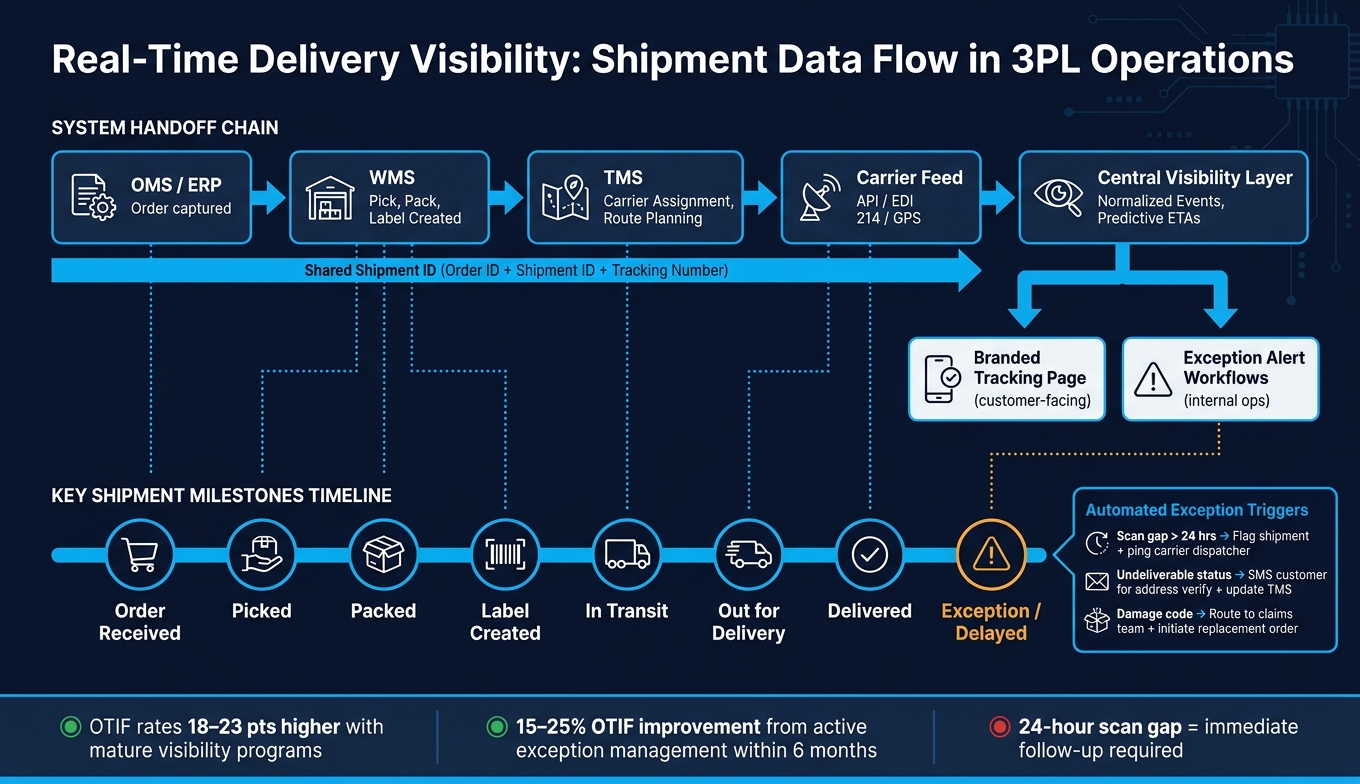
Real-Time Delivery Visibility: How Shipment Data Flows from Order to Delivery
Every shipment starts with order data in the OMS or ERP. Once the order is captured, the WMS logs fulfillment events like pick, pack, ship, and label creation. Then the TMS connects the shipment to the carrier and ties the order to its tracking ID. When the shipment is ready to leave the warehouse, the TMS handles carrier assignment and route planning.
Those handoffs are what build the event trail that both customers and ops teams depend on. If one link breaks, the whole timeline can feel off.
Key Shipment Milestones That Should Be Visible in Real Time
Not every update carries the same weight. The milestones that matter most are:
- order received
- picked
- packed
- label created
- in transit
- out for delivery
- delivered
- delayed
The next job is to make those milestones line up across every carrier feed. Otherwise, one carrier might say “in transit” while another uses a totally different status for the same moment.
Where Carrier Updates Come From and How They Are Normalized
Carrier data comes in from a few main sources: direct carrier APIs, EDI 214 status messages for freight, and GPS truck tracking. If a carrier doesn’t support API or EDI, mobile tracking apps can fill the gap with real-time GPS updates.
Normalization is the step that turns messy raw carrier codes into a consistent internal status set, with matching timestamps and locations. That’s what helps ETAs stay accurate across providers. Put simply, it turns a bunch of different carrier “languages” into one timeline your systems can use.
Why Event Quality Matters as Much as Event Speed
Fast updates don’t help much if the data is wrong. In fact, bad data is worse than slow data.
Duplicate scans are a common issue, and mismatched tracking IDs can leave holes in the shipment timeline. Clean IDs and accurate timestamps are what make the timeline dependable.
sbb-itb-eafa320
How WMS, TMS, OMS, and Carrier Tools Connect
Clean events only matter when OMS, WMS, TMS, and carrier tools all point to the same shipment record. That’s the whole game. Real-time visibility lives or dies based on how well these systems pass shipment data back and forth.
OMS and WMS Links That Create Pre-Shipment Visibility
Before the carrier takes the package, you need to map Order IDs, Shipment IDs, and Tracking Numbers across the OMS and WMS. If that link is missing, pre-shipment status falls apart.
Here’s the problem in plain English: if those identifiers don’t match before carrier handoff, the order drops into a visibility gap. The customer can’t tell what’s happening. The ops team can’t tell either.
Once those IDs line up, shipment status can pass cleanly into carrier tracking.
TMS and Carrier Connections That Power In-Transit Updates
After the shipment leaves the dock, the TMS should match carrier updates against planned delivery windows and flag ETA drift before it turns into a missed delivery. That matched status then becomes the single source of truth for customer-facing tracking and exception handling.
Using a Central Visibility Layer Across Multi-Site 3PL Networks
When a 3PL runs multiple warehouses and works with several carriers, no single system can see the whole picture by itself. A central visibility layer pulls data from the ERP, WMS, and TMS into one operational view.
That layer standardizes shipment data across systems and carrier feeds. It aligns dates, location codes, and shipment identifiers, then flags exceptions like delays and generates predictive ETAs based on historical data and real-time conditions.
Those standardized events are what keep branded tracking pages and exception alerts accurate.
Customer Tracking Pages and Exception Alerts That Cut Support Load
Once carrier and warehouse events are standardized, you can turn that data into customer updates and internal alerts. When this is set up well, it cuts WISMO ("Where Is My Order?") contacts and gives support teams more time for problems that need a person.
What Customers Should See on a Branded Tracking Page
A branded tracking page should answer one thing fast: Where is my order, and when will it arrive?
That calls for plain-language status updates, the order number, the latest location or checkpoint, and an ETA. The tracking page also needs to use the same shipment ID that appears across the OMS, WMS, TMS, and carrier feeds. If those IDs don't match, things get messy fast.
When a shipment is delivered, the proof of delivery (POD) should show up on its own with a timestamp. The portal should also be multi-tenant, so each brand gets its own branded view from one system.
Just as important, the same shipment record should power both the tracking page and the notifications. One source, one version of the truth.
Which Events Should Trigger Notifications and Alerts
Proactive updates should go out for these shipment events:
- Order confirmed
- Label created
- In transit
- Out for delivery
- Delivered
- Delayed
- Exceptions
Each message should tell the customer something new. If the status hasn't changed, don't send another alert. That's how you keep updates useful instead of noisy.
How Exception Workflows Should Run Inside the 3PL Operation
Exception workflows should run on their own for missed scans, failed delivery attempts, bad addresses, weather delays, and off-route movements. The goal isn't just to spot a problem. It's to move on it right away.
Here's what that looks like in practice:
- A 24-hour scan gap should flag the shipment and ping the carrier dispatcher.
- An "undeliverable" status from the carrier should trigger an SMS asking the customer to verify their address, while updating the TMS record at the same time.
- Damage exception codes should route straight to the claims team and, when needed, start a replacement order workflow.
Every alert should include enough shipment context for the team to act fast instead of hunting through systems for basic details. Teams that do this well report a 15% to 25% improvement in On-Time In-Full (OTIF) rates within six months of putting active exception management in place.
The fix matters as much as the alert itself. If the ETA changes, push the revised ETA to the tracking page and notify the customer right away.
The next step is to audit these event feeds before scaling them across every site and carrier.
How to Set Up and Measure Real-Time Delivery Visibility
Audit the Current Visibility Baseline Across Systems and Carriers
Before you change anything, map out where shipment events stop syncing across the full order journey: pre-fulfillment, warehouse handoff, in transit, out for delivery, and returns. The point is simple: find the blind spots where a physical milestone happens, but the digital update never shows up.
Start with your tech stack. List the WMS, TMS, OMS, and carrier connections you use, along with how they connect through APIs, EDI, or middleware. Then measure data latency - the time between a physical event, like a truck leaving the dock, and when that update appears in your system. Aim for minute-level latency, not multi-hour delays.
As you review carrier connections, focus first on the carriers that handle the most volume. If a top carrier still doesn't support APIs, mark that connection for an upgrade. Also leave room for data cleanup before integration work starts. That includes customer master data, carrier rate contracts, and shipment attributes.
You should also confirm that the tracking page reflects live OMS, WMS, TMS, and carrier status. If the customer-facing page lags behind the source systems, the problem isn't just internal - it shows up for customers too.
Track the visibility gap as well: the percentage of milestones that happen without a matching system event. That metric gives you a better read on tracking health than a dashboard total by itself.
Build a Standard Event Model and Operating Process
The audit tells you where tracking breaks. The event model is what fixes it.
Once you've found the gaps, standardize the events and ownership needed to close them. Every carrier, warehouse site, and system should use the same milestone definitions and shared shipment IDs so data can be tied together in a dependable way.
Define clear triggers for each stage, including:
- order received
- inventory allocated
- carrier assigned
- departed facility
- arrived at hub
- out for delivery
- proof of delivery captured
Map which system owns each event, and assign responsibility for what happens when an exception is triggered.
Exception alerts should fire automatically, without manual input. You also need clear internal escalation steps for delays, route changes, or missed milestones.
Conclusion: What a Reliable Visibility Program Requires
Real-time delivery visibility depends on accurate event flow, close WMS-TMS-OMS-carrier integration, customer-facing tracking that stays current, and exception handling that moves fast. Each part supports the next. Brands that treat visibility as core infrastructure can cut manual work, recover faster from disruptions, and keep the customer experience steady as they grow.
FAQs
What data do I connect first?
Start with your WMS and ERP. These are the main systems of record for inventory, purchase orders, and financial data.
Then connect carrier networks for tracking, tender, and shipment status updates. After that, bring in your OMS so order data flows into customer-facing tracking portals.
When these core systems work together, you cut down on data gaps and support accurate visibility.
How fast should tracking updates appear?
Tracking updates should show up as often as your system can support to give you near-real-time visibility. That can mean anything from every few seconds to every few minutes.
API integrations and webhooks are the best fit here because they send status changes to your storefront and internal systems within seconds. That cuts out the lag you often get with batch reports and helps keep shipment data up to date.
How do I reduce WISMO calls with visibility?
Reduce WISMO (Where Is My Order) calls by giving customers self-service access to real-time shipment updates through branded tracking portals. That way, they can check an order on their own from picking and packing to transit and final delivery, without reaching out to support.
You can also send automated email or SMS updates at key milestones, so customers hear from you before they feel the need to ask. And when your WMS connects with carrier systems, tracking data and estimated delivery dates stay accurate and consistent.
Related Blog Posts
Related Articles

Demand-Driven Replenishment for Multi-Node 3PL
3PL Models Compared for Reverse Logistics Carbon