
Ultimate Guide to Automation Change Management
Warehouse automation fails less from machines and more from people, timing, and weak rollout plans. If I were planning an automation launch in a U.S. warehouse, I’d focus on four things first: clear ownership, role-based training, phased rollout, and post-go-live KPI reviews.
Here’s the short version:
- Change management is what keeps automation from hurting service levels
- Leadership support, floor communication, and worker buy-in drive adoption
- Training should start 4–8 weeks before go-live and match each role
- Productivity often drops 10%–20% in the first 2 weeks
- 30 days of baseline data should be collected before launch
- ROI often lands in 9–12 months with change planning, but can slip to 18–24 months without it
- Nearly 40% of first rollouts miss ROI targets, but review work can recover 25%–40% of the gap
If I had to reduce the whole article to one idea, it would be this: automation works when people, process, tech, and ROI are planned together - not one at a time.
A few points stand out:
- Map how receiving, putaway, picking, packing, and shipping will change
- Define what happens to each role: reskill, redeploy, support, or exit
- Use a staged rollout: sandbox → pilot → canary → scale
- Set clear rules for incidents, manual overrides, safety checks, and exception handling
- Review results at 90–180 days, then quarterly
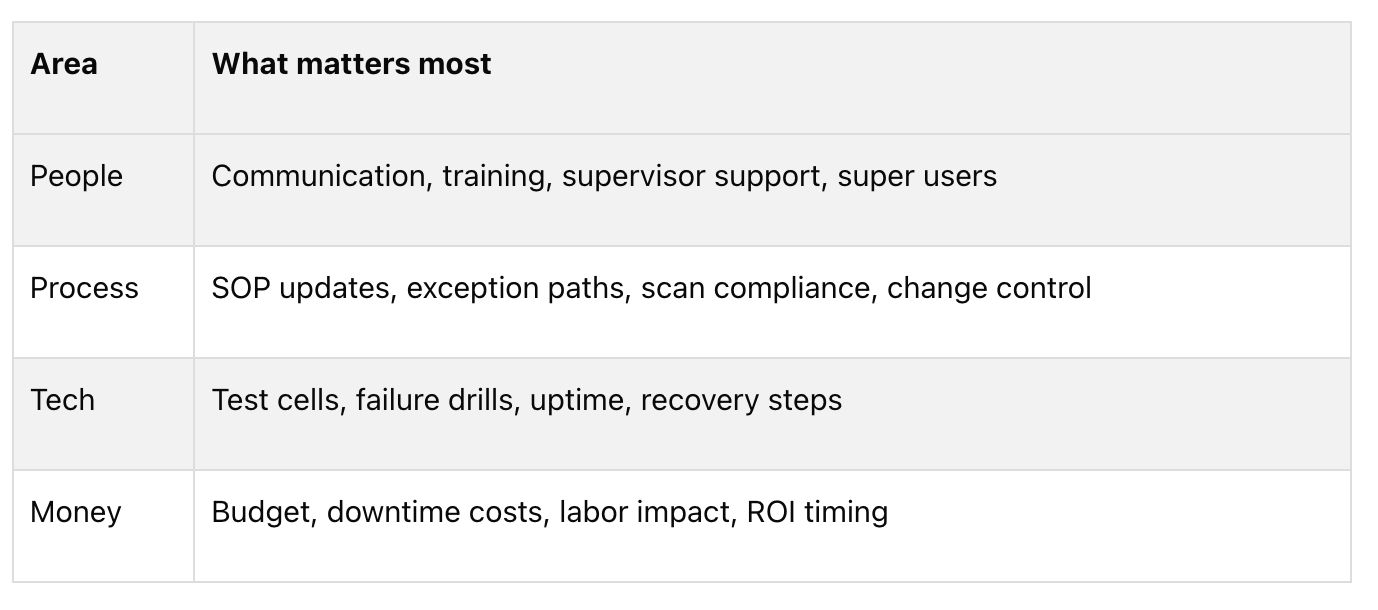
So before any robot, conveyor, or software update goes live, I’d make sure the floor knows what is changing, why it is changing, who owns each issue, and how success will be measured.

Warehouse Automation Change Management: Key Stats & Framework at a Glance
Warehouse Technology Trends: Migrating from a Manual to a Fully Automated Warehouse
sbb-itb-eafa320
Core frameworks and planning steps for automation change
Structured change management helps automation projects land faster and with less friction. The job now is to turn that approach into a rollout plan people can actually run.
Applying Kotter, ADKAR, and process-based models to warehouse automation
There isn't one framework that works for every warehouse or fulfillment automation project. The best fit depends on what matters most at the start: leadership alignment, frontline adoption, or day-to-day execution across teams.
- Kotter's 8-Step Process: best for urgent, large-scale operational transformations; it can feel too top-down for frontline teams.
- ADKAR: best for individual adoption and technical skill building; it can require a lot of one-on-one management time in large 3PL settings.
- Lewin's Model: best for breaking manual work habits; less detailed for complex technical integration.
- A 4-phase process model: best for cross-functional execution in warehouse operations; fits production schedules and floor-level operations, though it requires strong operational maturity to execute.
In practice, many warehouse automation projects do better with a mix. Kotter helps create urgency and build a guiding coalition at the leadership level. ADKAR supports the individual journey, so pickers, supervisors, and maintenance techs know what is changing and how to work with the new system. A 4-phase process model keeps execution tied to production schedules and KPIs.
Operational assessment, stakeholder mapping, and future-state design
Before any equipment shows up, the operation needs a plain view of what will change and who will feel it. That starts with mapping current workflows across receiving, putaway, picking, packing, and outbound shipping in enough detail to spot where automation changes labor, timing, and handoffs.
Stakeholder mapping should go past department names. Break the workforce into role groups such as pickers, lift drivers, supervisors, and maintenance techs, then define a transition path for each one: augmented by robotics, reskilled into a new role, redeployed to a different function, or separated.
Future-state design should tie back to KPIs like throughput, order accuracy, safety, and labor hours. It also means rewriting SOPs with shift leaders, not just for them. Teams should collect 30 days of baseline data before implementation so they have an objective benchmark for post-go-live results.
Building the business case, risk controls, and rollout budget
Once the future state is mapped, the next move is to lock the budget and risk controls. A solid business case looks at the whole picture: labor savings, equipment and software costs, maintenance, training spend, expected downtime during the transition, and contingency costs. A useful rule is to put 10% to 15% of the total project budget into change management work. That covers communication, training, governance, and contingency planning. With structured change management, ROI is usually reached in 9–12 months. Without it, that often slips to 18–24 months.
Not all automation changes the organization in the same way. Some tools are harder on training, some hit staffing harder, and some do both.
- AMRs (mobile robots): moderate change complexity, high labor impact, and medium training intensity.
- AS/RS (automated storage and retrieval): high change complexity, high labor impact, and high training intensity.
- Conveyors and sortation: medium change complexity, low to medium labor impact, and medium training intensity.
- Cobot cells: moderate change complexity, low labor impact, and medium training intensity.
- WMS/TMS software: medium to high change complexity, medium labor impact, and high training intensity.
Those risks need to show up in the rollout timeline up front, not in a postmortem after things go sideways. Workforce resistance should be addressed 60 days before deployment through communication, operator involvement in design sessions, and messaging that frames automation as a capability investment. Teams should expect a 10% to 20% productivity dip in the first 2 weeks and use phased rollouts to contain it. For technical failure risk, build an isolated sandbox test cell and run simulated failure drills before go-live. To prevent training gaps, use a role-by-role skills matrix and certification program before go-live. Seasonality matters too, so throughput should be stress-tested and ramp-up phases finished before peak season starts. Safety risk needs role-specific training, plus floor markings and signage in automation zones.
Managing workforce adoption and reducing resistance
Once the future state is set, the next job is getting people to use it well.
What drives resistance in fulfillment and warehouse teams
Resistance usually comes down to a few simple worries: job security, safety, workload, and changes to day-to-day responsibilities. In shift-based operations, rumors move fast. That’s why leaders need to explain the business case and the personal upside early, before people fill in the blanks on their own.
Recent system or layout changes can make things worse. If the team has already been through a lot, change fatigue shows up fast. Supervisors have their own concerns too. If a system now directs task assignments, the supervisor’s role needs to be clearly defined before go-live.
Communication channels and feedback loops that improve adoption
Email and slide decks rarely reach the floor in a way that sticks. Shift huddles, supervisor cascades, and two-way feedback work better.
Supervisors should use the same talking points across teams and shifts. Those talking points need to cover three things: why the change is happening, what is changing in the role, and what employees can expect to gain from it. It also helps to use super users - trusted frontline peers trained early to explain system changes in plain language for the floor. Dashboards can help supervisors, but they shouldn’t replace zone walks or coaching.
A few channels tend to work best:
- Shift huddles: daily updates, immediate feedback, and morale checks
- Super user coaching: peer-to-peer troubleshooting and trust building on the floor
- Supervisor cascades: turning technical updates into role-specific tasks
- Anonymous surveys or feedback boxes: surfacing quiet resistance and safety concerns
That feedback should go straight into training updates and supervisor coaching. If people keep getting stuck in the same spot, the fix usually isn’t another email. It’s better coaching, clearer instructions, or a small process change.
Training, reskilling, and job redesign for human-automation collaboration
Training needs to match the role. Pickers, drivers, maintenance techs, and supervisors do not need the same skills, so they should not get the same training. Each role needs to know how to work with the system, deal with exceptions, and protect throughput.
A solid training plan has four layers: strategic context, role-specific task execution, exception handling, and hands-on rehearsal before go-live.
Supervisor training should focus on reading dashboards, balancing workload, and coaching the process on the floor. Reskilling should start 4 to 8 weeks before deployment. Companies often spend $2,000 to $8,000 per affected employee on transition programs, with robot operator training at $2,000–$3,000 per person and robot technician training at $5,000–$8,000 per person, depending on complexity.
Job redesign matters just as much as training. When automation takes over repetitive physical work, people’s roles move toward system oversight, quality review, and exception resolution. A picker might move into a robot operator role or a quality data analyst position. A material handler might become a fleet coordinator. These are new jobs, not just old jobs with new labels, so they need clear growth paths.
One stat makes the point pretty clearly: 45% of underperforming robot deployments are caused by workforce resistance rather than technical issues. That means training and job redesign are part of the operating backbone of the rollout, not some side task for HR.
Those role paths need to be built into the rollout plan before go-live.
Executing the rollout and stabilizing operations
Once roles are trained and SOPs are updated, it’s time for a controlled deployment.
Pilot programs, phased rollout, and peak-readiness testing
Roll out in stages: Sandbox → Pilot → Canary → Scale. Start by checking logic in a digital twin, test in one zone or with one SKU set, and only expand after each stage is stable. Operator training should follow the same sequence. That keeps risk contained, lets teams tighten SOPs based on floor feedback, and allows manual work to continue in other areas.
Before any major volume spike, run failure simulations for network loss, power loss, and WMS latency. The goal is simple: make sure manual recovery steps still work when the system is under pressure. Simulation and certification before go-live can reduce exception handling and help teams ramp up faster.
Go live during a controlled-volume window. Launching right before peak is a costly way to learn. But going live during very low-volume periods has its own trap: it can hide volume-driven bugs until later, when they’re tougher to fix.
As rollout moves from one area to many, tighter process control starts to matter a lot more.
SOP redesign, governance roles, and change control during go-live
Once automation is live, paper-based and memory-based workflows fall apart fast. Every inventory move needs scan compliance.
SOPs also need to spell out exception ownership in plain terms. Who handles empty locations? Damaged units? Label scan failures? If those paths aren’t written before go-live, floor teams will make up their own fixes on the fly, and inventory accuracy can slip fast.
Human-in-the-loop decision rights need the same level of clarity. Teams should know which alerts need manual action, which ones can clear on their own, and who makes the final call when a threshold is hit. On the floor, that usually means:
- The site automation lead owns the go/no-go decision
- The site SRE owns observability and runbooks
- Automation operators handle first-level troubleshooting
- The safety lead signs off on physical motion changes
- Superusers coach peers and translate technical language for floor teams
Every automation update should ship with a versioned runbook for the top failure modes. High-performing sites in 2026 aim for a Mean Time to Resolve of under 30 minutes for class-1 automation incidents. That target only works if operators already have the runbook before something breaks.
Those controls also need to hold up under safety and compliance demands.
Safety, compliance, and service continuity during transition
Physical automation brings risks that don’t exist in a manual warehouse. Before any hardware shows up, run a pre-installation hazard assessment that covers traffic flow, pinch points, emergency stop placement, and human-machine interaction zones. During early deployment, safety SLOs should target zero class-A incidents, and near-miss reports should be closed within 72 hours.
OSHA rules still apply during rollout. Guarding requirements, lockout/tagout procedures, and ergonomic risk reviews must match the new system setup, not the old one. Safe execution helps protect uptime and keeps customer commitments on track.
If a cutover puts service levels at risk, JIT Transportation’s distribution, fulfillment, pick and pack, kitting and assembly, and white glove handling services can absorb part of the workload spike while internal teams steady the new system. That kind of buffer can keep the transition moving without putting customer commitments at risk.
These controls set the starting point for post-go-live KPI tracking.
Measuring results, scaling across sites, and conclusion
KPIs, post-implementation review, and continuous improvement
Use the rollout baseline to check whether the new process is working the way it was supposed to. Go-live isn't the finish line. It's when measurement starts.
Compare results against pre-automation performance. Use 30 days of pre-automation data as the baseline for review, including throughput, order accuracy, and labor hours. Then review performance at 90 to 180 days, and after that, review it quarterly. This matters because nearly 40% of initial automation rollouts miss their original ROI targets. The good news: systematic post-implementation optimization can recover 25% to 40% of that gap.
Track KPIs across three groups:
- Employee/adoption: adoption rate, percent of certified operators, sentiment, turnover, absenteeism, and training completion
- Operational: throughput, order accuracy, system uptime, exception rate, ramp-up time, and mean time to recover (MTTR)
- Financial: cost per pick, total change cost, ROI versus projection, labor savings, overtime reduction, and transportation savings
One KPI teams often miss is manual overrides. It sounds small, but it can tell you a lot. Require reason codes for every system bypass. If fewer than 90% of tasks stay on-system, or if operator exception rates rise more than 10% above baseline, treat that as a warning sign. In plain English, people may be working around the system, training may not be sticking, or the process itself may have problems that call for an SOP review.
Clear triggers make it easier to act before small issues turn into bigger ones. If order accuracy drops below the manual baseline, MTTR goes past the vendor SLA, or ramp-up time slips by more than two weeks, escalate fast. That can mean integration audits, more on-site support, or failure drills.
Training shouldn't end at go-live either. Monthly refreshers and incident reviews help keep automation fluency from fading over time.
Scaling automation change management across facilities and programs
Use what you learn from the first site to set readiness gates for the next one. But don't assume one site's playbook will fit every building. Each facility needs its own readiness check.
Layout, labor mix, peak-season pressure, and customer requirements all shape how a rollout should work. That's why a copy-and-paste launch usually falls apart. The model that tends to hold up across a network uses one shared framework, with local adjustments to training, communication cadence, and exception paths.
Before you expand, set hard gate criteria. For example, require a robot success rate above 98% and MTTR under 15 minutes at the current site before the next site starts. Those numbers give teams a simple way to decide if the model is ready to travel.
A superuser network at each facility can make a big difference. These internal experts cut reliance on outside vendors, coach peers, and handle the first wave of support when something breaks. Pair that with a centralized lessons-learned knowledge base so each new site can start with proven fixes, not trial and error. For nationwide networks, JIT Transportation can help standardize rollout practices while adjusting training and exception paths by site.
Conclusion: The principles that make automation stick
Once the model works at one site, standardize the core process and localize the exceptions.
"The difference between a struggling implementation and a high-performing operation is almost always how well the organization aligns, communicates, trains, and measures success." - Tompkins Robotics
Automation delivers value only when the change around it gets the same level of attention as the technology. That means aligning stakeholders early, training by role instead of by department, communicating through more than one channel, launching in phases, and measuring both adoption and operating results. It also means refining the model as volumes grow and new automation capabilities come online.
The technology is the easy part. The change is the work.
FAQs
How do I know if my warehouse is ready for automation?
Start with a full review of how your operation runs. Make sure your processes are clearly defined, repeatable, and standardized. Automation should make work simpler, not turn messy workflows into digital messes.
You’ll also want to look at data quality, key metrics from at least six months, and your team’s past experience with automation. That gives you a clearer view of ROI potential and the level of support needed to make the effort stick over time.
Who should own automation change management internally?
Ownership needs to start with the executive team. When leaders take charge early, they send a clear signal: this change matters.
But it can't live ONLY at the top.
Leaders also need to give key team members clear ownership in their areas. That’s how change moves from a leadership message to daily action.
Local champions matter too. These are trusted operators who know how work gets done on the ground. They can help close culture gaps, make the shift feel more practical, and support adoption through peer influence.
What should we do if adoption drops after go-live?
Treat it as an operations problem that needs fast action from leadership, not just something for IT to handle. Track adoption every day so you can spot which features or workflows people are skipping.
Then step in with focused coaching or follow-up training where usage is low. Leadership also needs to keep backing the new process in a steady, visible way. When people fall back on manual workarounds, it sends a clear message that the system is optional.
Related Blog Posts
Related Articles
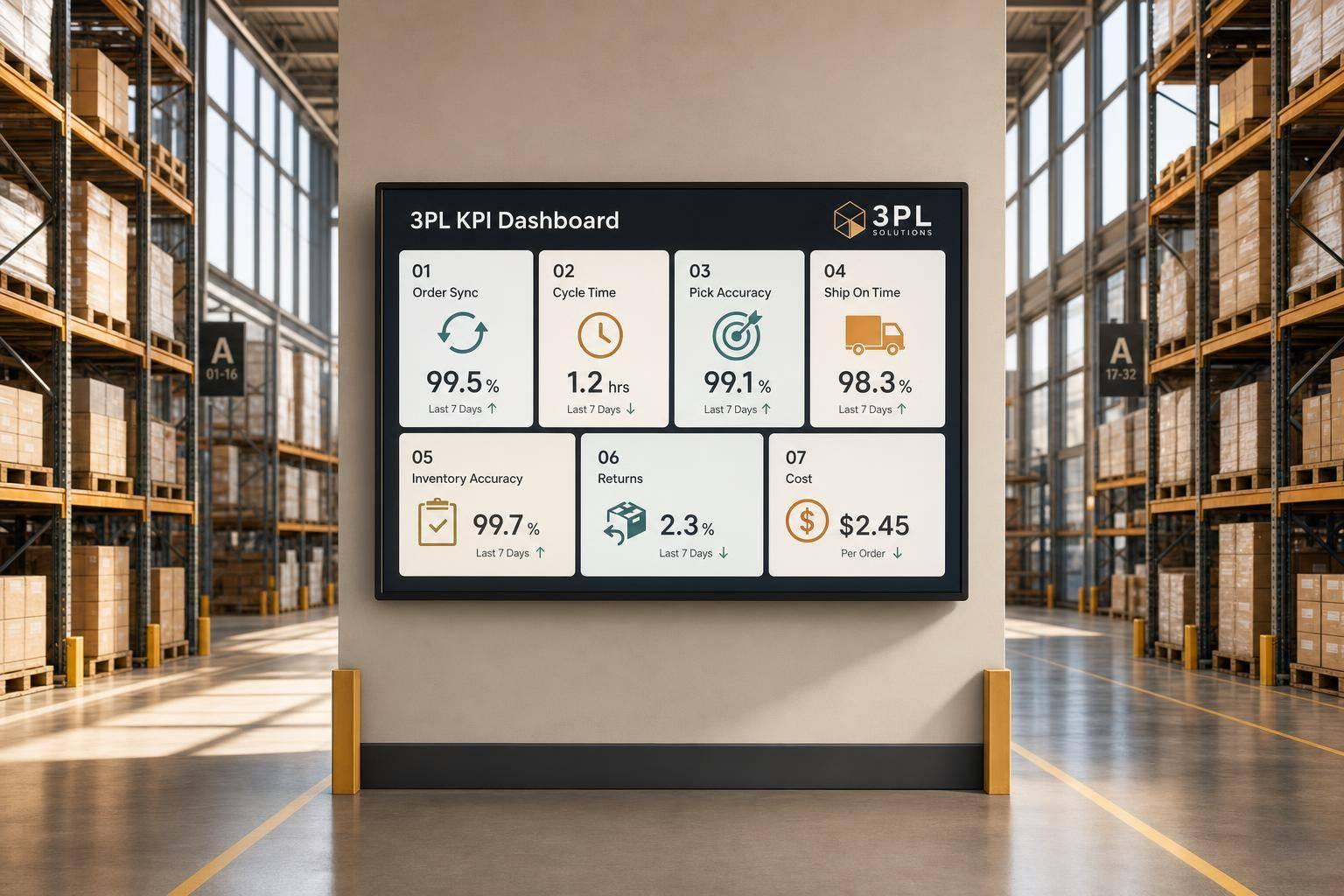
7 WooCommerce 3PL KPIs Teams Track

Centralized vs Decentralized Replenishment
